Lumbridge Work

Gated · opens on November 13, 2026

Lumbridge Mail Agents draft. Only a person sends.

Lumbridge Mail is a local-first mail client in Rust. One daemon syncs, stores and searches your accounts, and a desktop app, a command line and your agents all work on that same store. It treats every message as hostile input: models may sort, summarize and draft, but they never send, and sensitive mail never reaches a model at all.

Lumbridge Mail
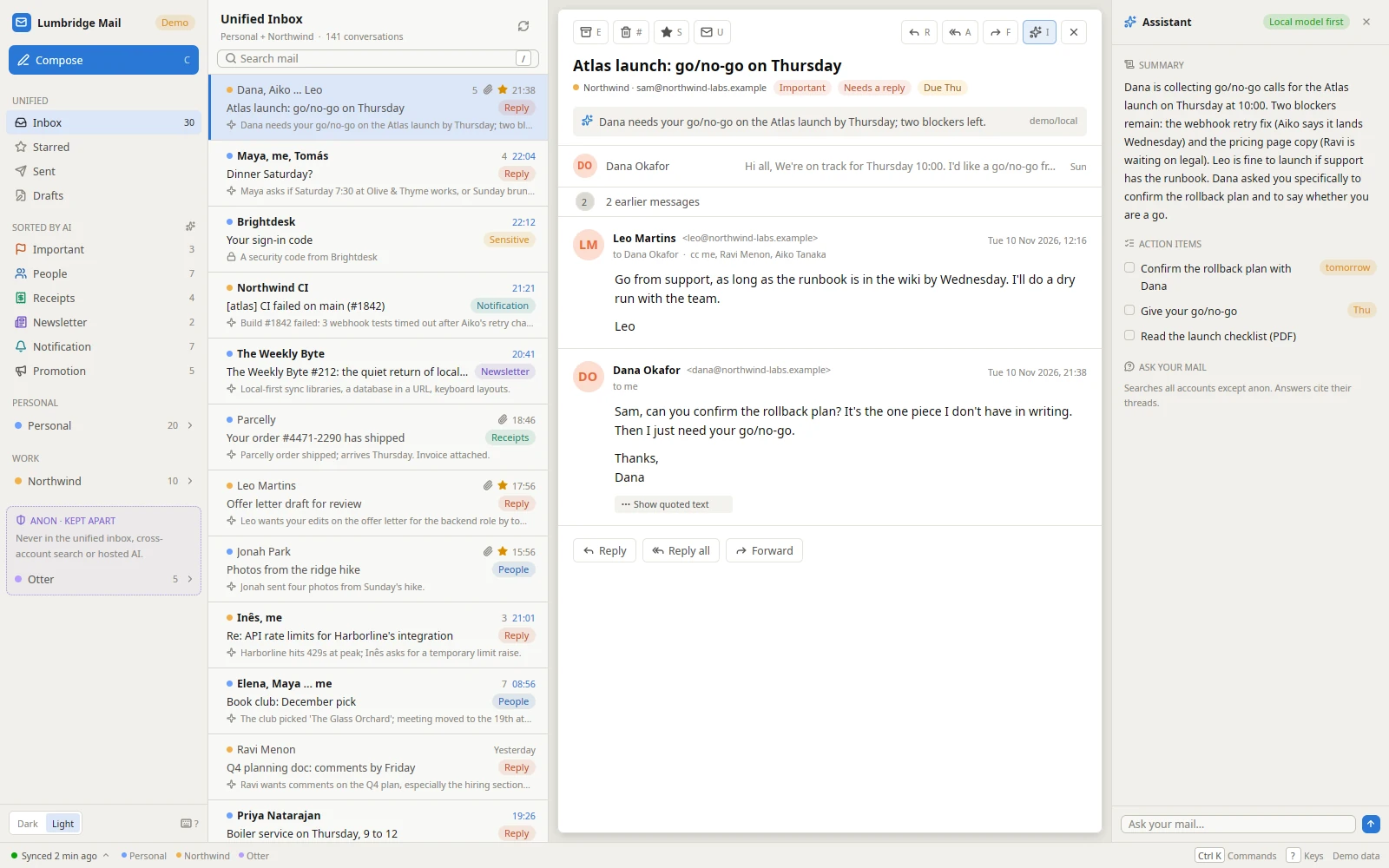
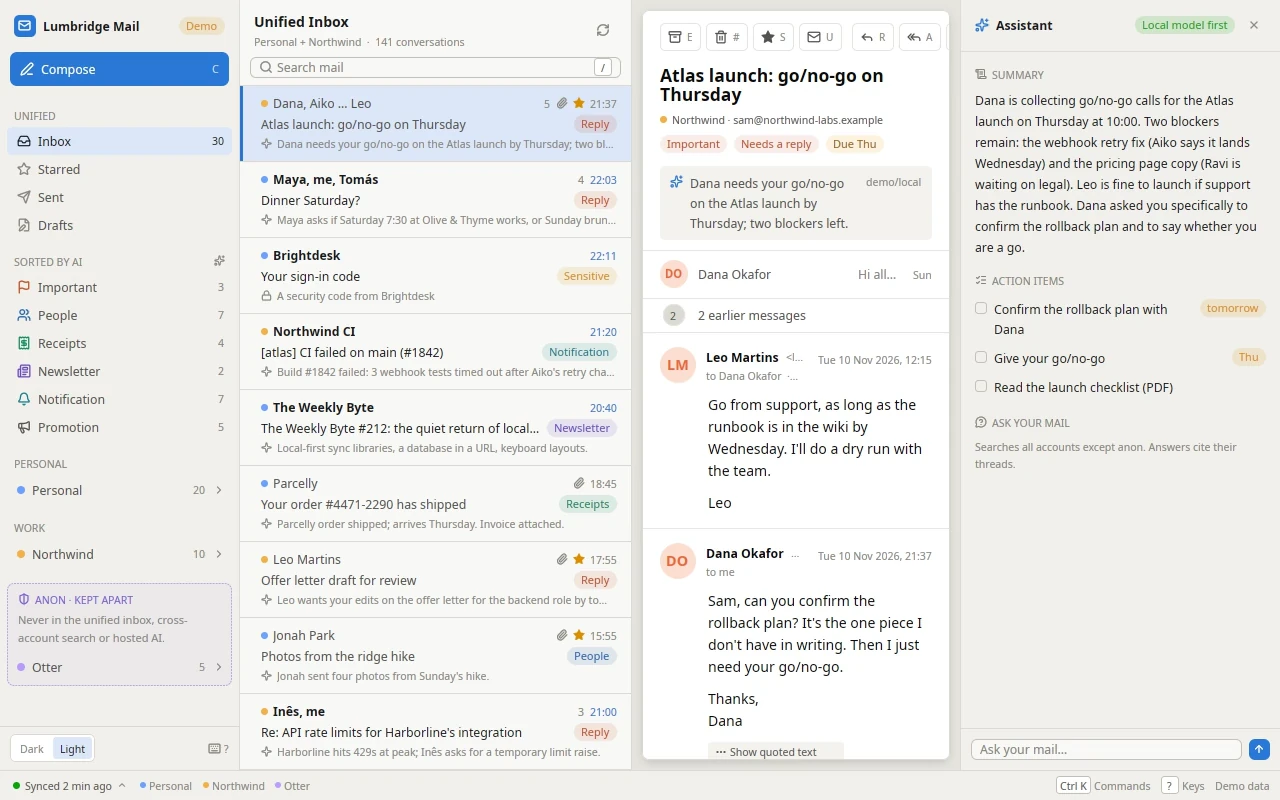
Lumbridge Mail: the keyboard moves down a unified inbox where every conversation has a label and a one-line summary, then a conversation opens and the assistant panel lists its summary and action itemsLumbridge Mail: the keyboard moves down a unified inbox where every conversation has a label and a one-line summary, then a conversation opens and the assistant panel lists its summary and action items
Move through the sorted inbox with j and k, open a conversation, read its summary.Open full sizeOpen full size

Tour

See Mail at work.

Assistant

A summary beside every conversation.

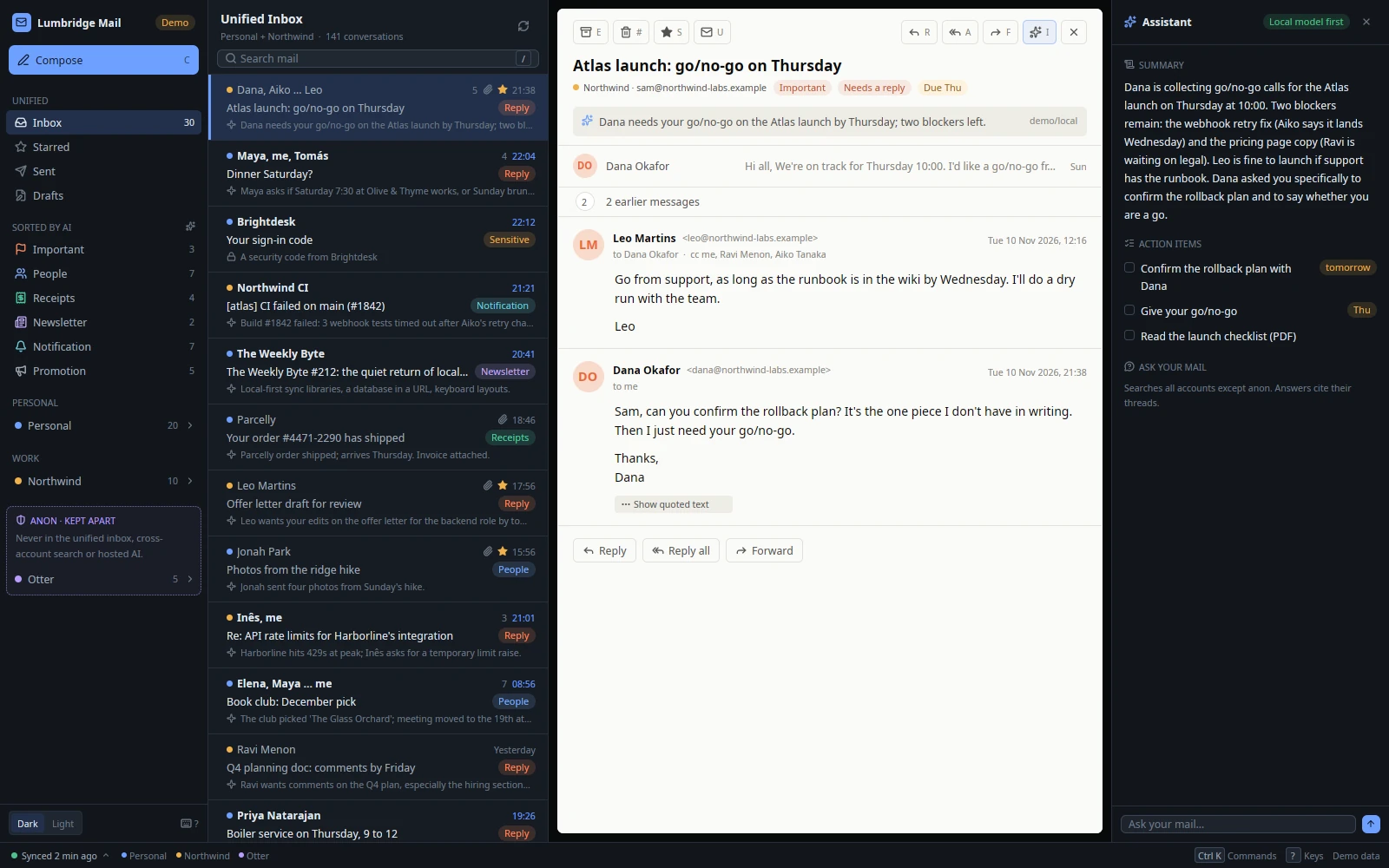
Open a conversation and the panel lists its summary and action items with due dates. Ask your mail a question from the same panel.

  • Sensitive mail never reaches a model.
  • Mail is data, never instructions.
  • Only a person sends.
Lumbridge Mail
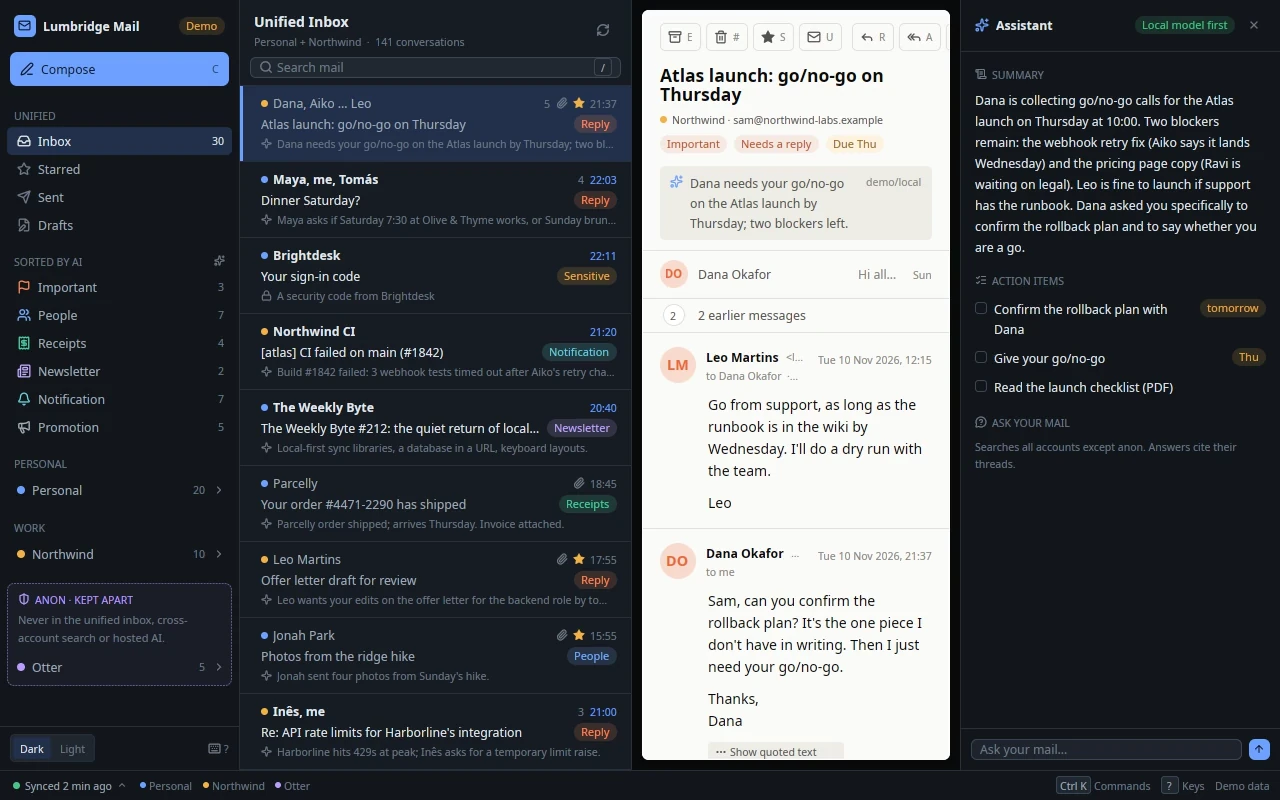
Lumbridge Mail with a conversation open between the inbox and the assistant panel, which shows a summary, three action items with due dates and a box to ask your mail a questionLumbridge Mail with a conversation open between the inbox and the assistant panel, which shows a summary, three action items with due dates and a box to ask your mail a question
One conversation: labels, a one-line summary, and the assistant's action items beside it.Open full sizeOpen full size

Reply

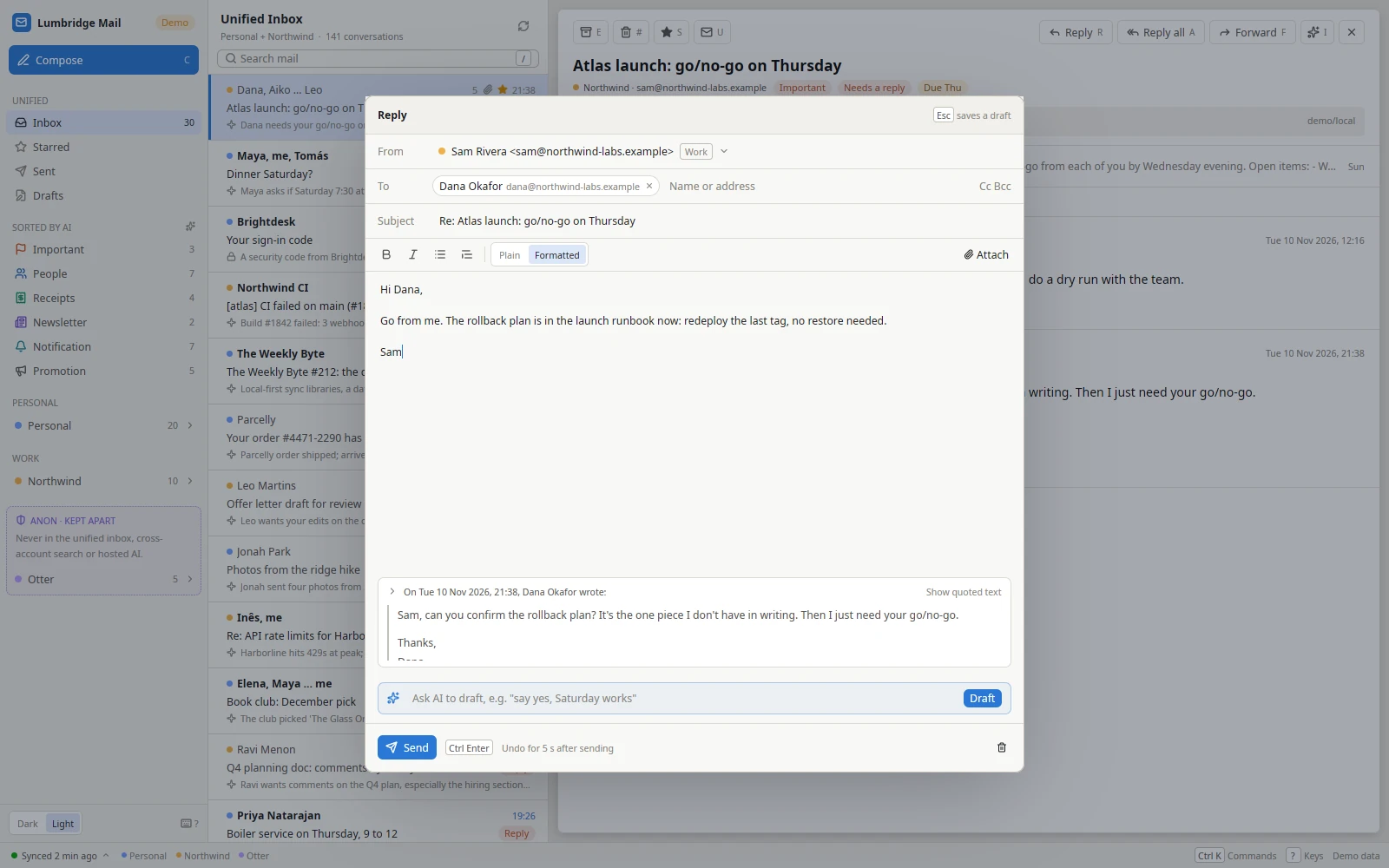
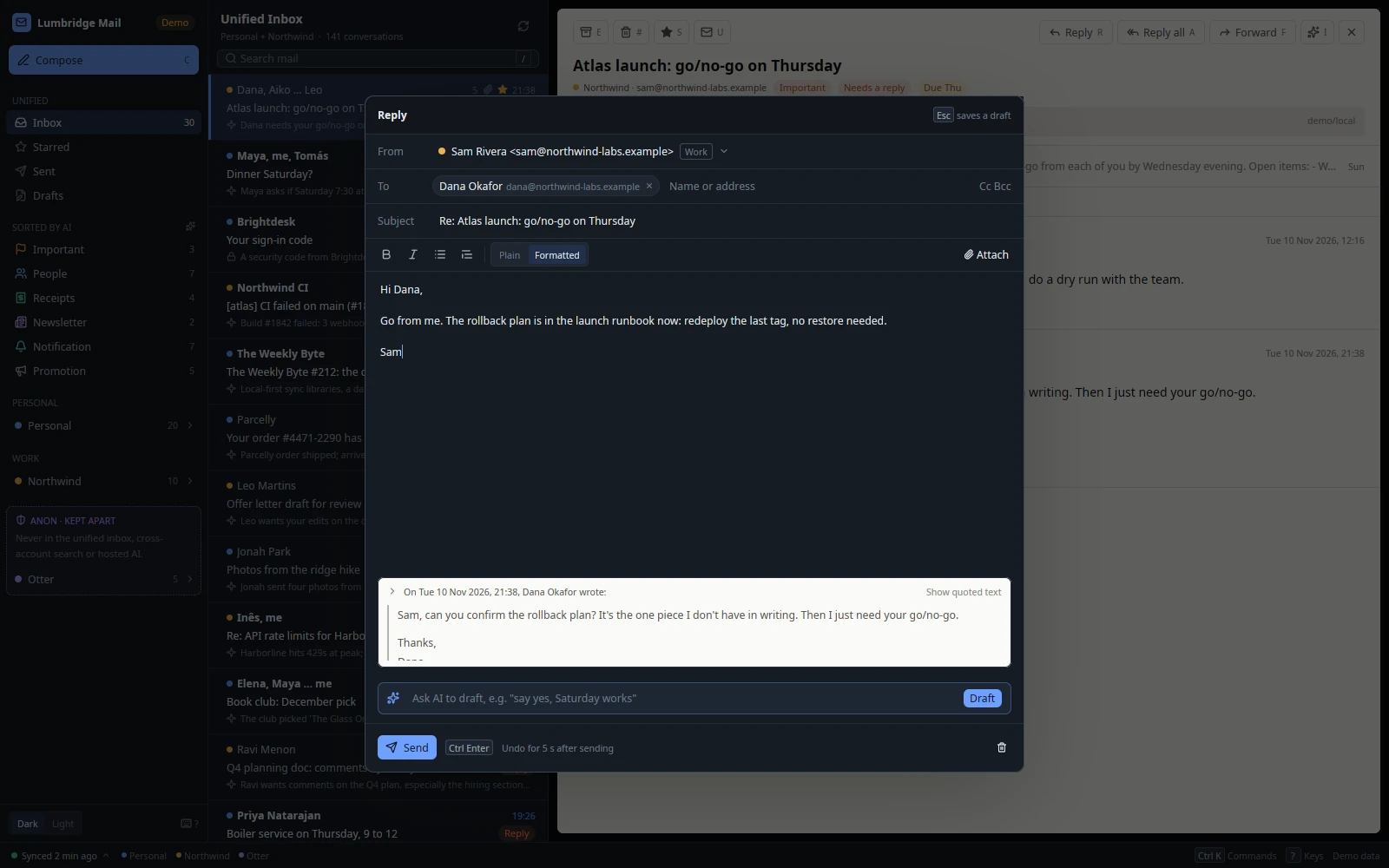
Write it yourself, or ask for a draft.

Send can be undone for five seconds. Shown in both themes.

Light
Lumbridge Mail reply window with a short typed answer, the quoted message below it, a line to ask for a draft and a Send button that can be undone for five seconds
Dark
Lumbridge Mail reply window with a short typed answer, the quoted message below it, a line to ask for a draft and a Send button that can be undone for five seconds
FIG. 1 — From the mail server to a draft a person sends

01 · What it does

What Mail does today.

One daemon owns the mail

lumbridge-maild syncs every account, keeps the store, runs the action queue and sorts new mail in the background. The app, the lbmail command line and agent tools are all clients of the same JSON-RPC socket, so triage happens whether or not a window is open.

Only a person sends

The daemon refuses a send from any connection that has not shown the person token, whatever the caller claims. lbmail has no send command at all. Agents write drafts; a person reads them and presses Send in the app, with an undo window.

Sensitive mail never reaches a model

Security codes, password resets, sign-in links, account alerts, bank and government mail are caught by plain rules before any model call. They appear as one fixed line, such as “A security code from Acme”, in lists, logs, notifications and to agents.

Mail is data, never instructions

Each message goes to the model between random markers, with hidden text, quoted history and chat-template markup removed. Outputs are checked: a summary may not carry links or addresses, and a draft’s recipients and subject are set by code, not by the model.

Personal, work and anon accounts

Every account has a persona and an AI policy: off, local only, or any. Anon accounts are a wall enforced in the core crate. They stay out of the unified inbox, search and ask unless you name them, and their mail never goes to a hosted model.

Local-first and keyboard-first

Changes are written to the store and a durable queue first, shown at once and sent in the background. Full-text search runs on SQLite FTS5 with operators such as from:, has:attachment and before:. Received HTML is sanitised, with remote images blocked until you ask.

02 · How it works

A daemon, a store and thin clients

The workspace is one crate per concern. The core crate holds the model, the protocol and the safety rules and does no I/O, so every other crate calls the same rules.

  1. 2.1

    Providers and sync

    A provider holds a connection, not state. Gmail goes through a Gmail command-line bridge that already holds the sign-in; everything else goes through IMAP with IDLE and SMTP. The engine owns the cursor, retries with backoff when offline, and checks Sent before it retries an interrupted send.

  2. 2.2

    Store and action queue

    A SQLite file caches accounts, mailboxes, messages, bodies, drafts and triage, with a full-text index. Archive, star, read and draft actions are applied locally in one transaction, then sent one at a time. A failed action is rolled back and reported as an event.

  3. 2.3

    Rules first, models second

    Header rules label newsletters, notifications and receipts with no model. Sensitive mail gets its fixed line. Only what is left goes to the OpenAI-compatible endpoint in your config, and only if the account’s policy allows a model in that place, local or hosted.

  4. 2.4

    Who is calling

    The socket is mode 0600 and drops connections from other Unix users. At each start the daemon writes a random person token next to it. A connection without the token is an agent: it cannot send, and it sees sensitive mail only as its one line. Read-only accounts refuse every change.

03 · Use it

Drive the same store from a terminal

lbmail talks to the running daemon. At a terminal it acts for a person; from a script or an agent it is an agent, and either way it cannot send.

Add an IMAP account, read, search, save an AI draft. Every command takes --json.
lumbridge-maild &
lbmail account add --id work --persona work --email sam@acme.example \
  --provider imap --imap-host imap.acme.example --smtp-host smtp.acme.example
lbmail account set-password work
lbmail status
lbmail ls --unread --category important
lbmail search from:billing has:attachment --account work
lbmail show work/t-q4
lbmail draft work/t-q4 "say yes and propose Thursday" --save
lbmail ask "what did we agree about the renewal?" --account work
lbmail archive work/t-q4
lbmail tail --count 5

04 · Docs

The Mail manual.

These pages are in the repository and open with it. Until then, the Guide covers the same ground and is readable now.

  1. 01

    Install and run

    Build the three binaries, install them on a Linux desktop without sudo or as a macOS app, and keep the daemon running as a user service.

  2. 02

    Architecture

    The daemon, the store, the providers and the AI layer, and the decisions behind them.

  3. 03

    Safety rules

    The seven rules every change must keep: hostile input, person-only send, sensitive mail, the anon wall, HTML, secrets and test data.

  4. 04

    Protocol

    The JSON-RPC methods, events, error kinds and the person token, for anyone writing a client or an agent tool.

  5. 05

    Configuration

    Every key in config.toml: daemon timings, the AI endpoint and its place, accounts, personas, AI policy and read-only mode.

  6. 06

    lbmail reference

    Each command, its flags and exit codes, and how it decides whether it acts for a person or an agent.

  7. 07

    Providers

    How the Gmail bridge and the IMAP and SMTP provider map mailboxes, ids, drafts and sync cursors.

  8. 08

    The desktop app

    Panes, keys, the composer, the AI panel, first run, notifications and read-only accounts.

Read the Guide chapter: Work appsRequest access to the repository

05 · Works with

One part of one system.

Not yet

  • No live account has been connected yet. It is tested end to end on made-up mail and scripted IMAP and SMTP servers.
  • JMAP and a native Gmail provider are not built. Gmail works through the bridge; IMAP has no OAuth sign-in or token refresh.
  • A separate, narrower socket for agents is not built. Full separation today means running agents as another Unix user.
  • Mail that needs real HTML layout is shown as a simplified block tree for now.
FIG. 2 — Where Mail sits in Lumbridge

Questions

Questions about Mail.

Where does my mail live?

On the machine that runs the daemon. Messages and the search index are in a SQLite file under ~/.local/share/lumbridge-mail, settings in ~/.config/lumbridge-mail, and passwords in the OS keyring. The app has no updater, telemetry or analytics; it connects only to your mail servers and the model endpoint you set.

What goes to a model, and what never does?

Per account you choose off, local only, or any. Sensitive mail is never sent to any model: security codes, resets, sign-in links, account alerts, bank and government mail. Anon accounts never go to a hosted model. Everything else is trimmed, fenced as untrusted data and sent to the endpoint in your config.

Can an agent send mail?

No. The daemon refuses a send unless the connection showed the person token and says it is a person. The token separates honest agents from the person. It does not stop a hostile program running as your own Unix user, so run agents as a different user if you need a hard wall.

Which mail providers work?

Gmail through a Gmail command-line bridge that is already signed in, and any IMAP and SMTP server with a password. A new Gmail account starts read-only, so nothing changes on the server until you allow it. A built-in demo provider serves made-up mail for trying the app with no network.

What does it run on, and under what license?

Linux desktops on X11 or Wayland, and macOS as an app bundle. You build from source with Rust. The code is Apache-2.0 and the repository opens on November 13, 2026.

Want Mail running for your team?

Self-host it, or talk to us about setting it up with you.