The speak command
speak Hello plays on this machine, sentence by sentence. Text can come from arguments or stdin. One speak plays at a time; a second waits its turn, and speak stop ends what is playing.
Lumbridge Voice
Gated · opens on November 13, 2026Lumbridge Speak turns text into audio. A small Rust program is both the HTTP front and the speak command; behind it sits an open text-to-speech model on your own GPU box. People use it to have text read aloud, and agents use it to say when a job is done.
Tour
The speak command
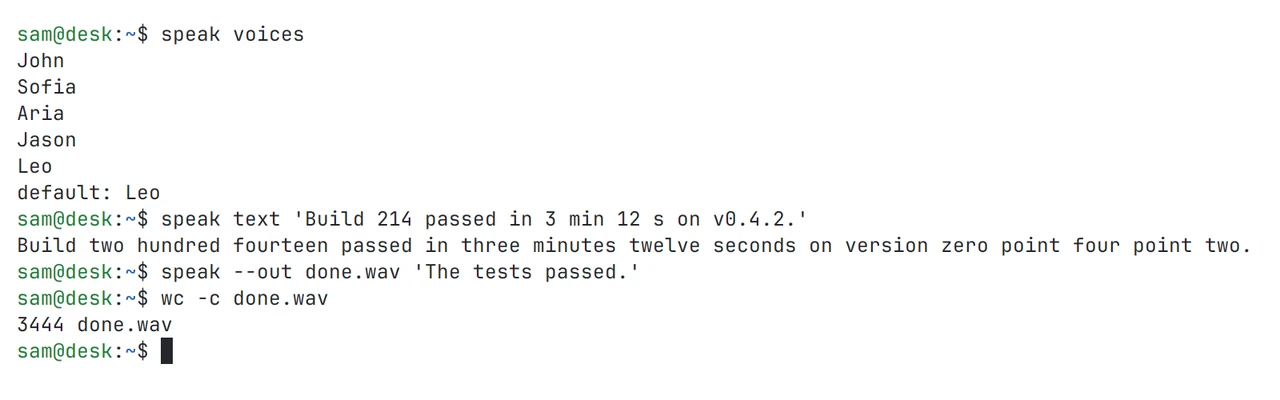
speak text prints the words before any audio is made: numbers and versions are written out. Shown in both themes.
01 · What it does
speak Hello plays on this machine, sentence by sentence. Text can come from arguments or stdin. One speak plays at a time; a second waits its turn, and speak stop ends what is playing.
Money, percentages, clock times, dates, phone numbers, versions, units, ranges, web addresses and file paths are written out before the model sees them. speak text prints the words that would be spoken.
A [say] table in the settings maps a written name to how it should sound. A drop list holds patterns that are never read aloud. Normalizing can be turned off in the settings or for one request.
speak voices lists the model’s built-in voices and speak demo plays each one. --voice picks one, --rate sets playback speed from 0.5 to 2, and a level setting scales every answer to the same peak.
speak --on NAME sends the line to a machine listed in the settings, which queues and plays it. That is how an agent on a server announces something through the speakers on your desk.
speak check has each voice say test sentences full of numbers, sends the audio to your speech-to-text server and compares what was heard with what was said, word by word.
02 · How it works
lumbridge-speak serves the HTTP API and, under the name speak, is the client of that same API. The model stays a separate server.
An HTTP service: /health, /v1/audio/voices and POST /v1/audio/speech with input, voice and response_format. It answers WAV and raw samples itself and uses ffmpeg for mp3, opus, aac and flac. It listens on loopback port 8813 unless the settings say otherwise.
Fenced code is removed, links keep their label, markdown marks become spaces. Then written forms are turned into words, and the text is packed into sentence pieces. The pieces are joined with a short silence between them.
The model sits behind a Synth trait. There are two adapters: one for the model server in use today and a mock that needs no model, so the front and its tests run anywhere. A new model is a new adapter.
Asks the front for audio and plays it with afplay on a Mac, or pw-play, paplay or aplay on Linux. Settings come from built-in defaults, then a TOML file, then LUMBRIDGE_SPEAK_* in the environment.
03 · Use it
The installer builds the program, starts the front as a background service on the Mac and links the speak command.
deploy/mac/install.sh              # build, install, start the front
speak Hello from Lumbridge Speak.
echo "PR 73 merged at 4:05 PM" | speak
speak --voice Jason --rate 1.1 Good morning.
speak --on laptop --from build-bot The build is done.
speak --out hello.wav Hello.
speak text "v0.3.1 took 645 ms"    # print the words, play nothing
speak voices
speak check

LUMBRIDGE_SPEAK_ADAPTER=mock lumbridge-speak serve   # the front without a model
curl http://127.0.0.1:8813/v1/audio/speech -o hello.mp3 \
  -d '{"input": "Hello.", "voice": "Leo", "response_format": "mp3"}'
04 · Docs
These pages are in the repository and open with it. Until then, the Guide covers the same ground and is readable now.
Every subcommand and option: say, voices, demo, check, text, stop, and speaking on another machine.
Routes, request fields, audio formats, error messages and status codes, with real answers from a running front.
Which written forms are rewritten, how phone numbers and versions are said, and how to turn it off.
The TOML file line by line: listen address, adapter, default voice, level, the [say] table, drop patterns, targets.
What the installer writes, the background service it starts, where the log is, and how to remove it.
The Synth trait, the mock adapter, and what a new adapter has to return.
Read the Guide chapter: VoiceRequest access to the repository
05 · Works with
Not yet
Questions
No. The front sends text only to the model server you point it at, and the audio comes straight back. There is no telemetry and no outside service in the path.
The front and the command run on Linux and macOS. Playback uses the players those systems already have. The model server needs a GPU box; the front can run on a laptop and reach it over your network.
On our own hardware, the check on 2026-11-10 had every voice between 99% and 100% of words understood, at about 6 times faster than real time while the GPU box was busy with other work. Your numbers depend on your GPU and model, and speak check measures them.
Yes, by writing an adapter. The front asks the model for raw samples one piece at a time through a single trait, so cleaning, chunking, formats and the command stay as they are.
Apache-2.0. The repository opens on November 13, 2026.
Self-host it, or talk to us about setting it up with you.