Docs
The manual. One manual, one chapter per part. The manual text lives in each repository and opens with it, so this page is the table of contents. What you can read today is the Guide: eight chapters, linked from every part below.
02 Runtime Core 03 Workspace App, TUI, Mobile, Mods 04 Work Mail, Notes, Library 05 Voice Voice, Speak 06 Build Factory 07 Compute Computer 12 chapters, in the repositories · 0 open today · Read the Guide now→
01 · Start here
Four steps to a working setup. 1.1 On one Ubuntu machine. The App and Mobile run on top of it.
1.2 The App on a desk, the TUI over a terminal, or Mobile on a phone.
1.3 Pair a second computer and run an agent on it from the first.
1.4 Mail, Notes and the Library, each behind a command an agent can call.
The first chapter
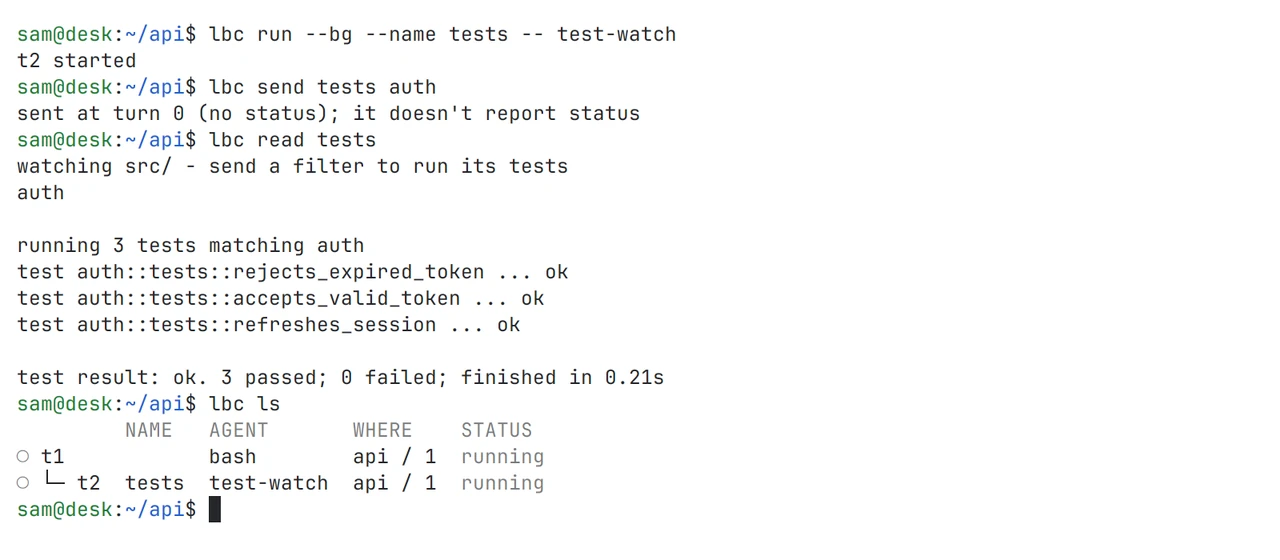
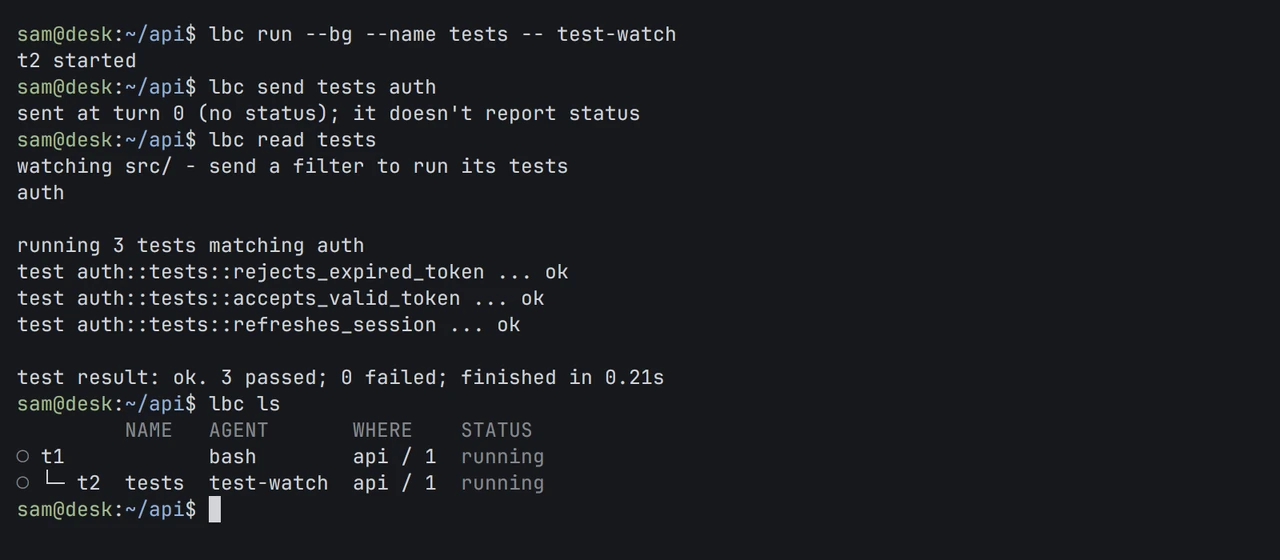
Run, send, read, list. Core is where the manual starts: four commands that start a program in the background, type into it, read its screen and list what is running.
Guide: install Core→
The terminal runtime that keeps programs and agents running.
Install and build Build from source with Rust, Zig and just, install lbc, and swap a running Core to a new build. Commands Every lbc command and flag, generated from the binary’s own help. Machines Adding machines over SSH or a custom connection, remote files, and what to check when a connection fails. Agent templates The template file format, readiness, and how the first message is sent. Security and trust Who can connect, what sessions do and do not separate, where state lives, and how updates work. API The OpenRPC document, plain and framed connections, the attach stream and event notifications. Agent skill The guide lbc --skill prints: how an agent delegates, waits, reports back and cleans up. Guide: Core→ About Core→ Request access→
03 · Workspace
App, TUI, Mobile, Mods. Desktop app for terminals and coding agents on all your machines.
Install and build Build from source with Rust and Zig, then run the Linux or macOS install script. Spaces, tabs and agents How work is arranged, what each agent status means, and peeking at a worker. Machines Adding an SSH machine and what runs where. Commands Every window action and its arguments, generated from the App. Layouts and mods The guide to layouts, settings, overlays, mod code and the App API. Keys The keys.json format and how to rebind any command. Shared state in labels The seen and pinned labels that every Lumbridge client reads and writes. Security and privacy What a mod can do, what stays on disk, and the local control socket. Guide: The workspace→ About App→ Request access→
Terminal workspace manager for coding agents, local or over SSH.
Install Build from source with Rust and Zig, or with the Nix flake, then verify and update. Quick start and concepts Workspaces, tabs, panes, agents, sessions, and the client and server split. Agents and integrations Which agents are recognized, how state is detected, and what each integration installs. Keyboard and configuration Prefix keys, copy mode, themes, notifications and the full config reference. Connecting machines Saved SSH machines, remote attach, reconnects and authentication recovery. Session state and restore What survives a detach, a server restart and a host shutdown, and how to recover a layout. CLI reference and socket API Every command, the raw socket methods, event subscriptions and the JSON schema. Plugins The manifest, commands, event hooks, panes, link handlers and how to share a plugin. Guide: The workspace→ About TUI→ Request access→
Lumbridge on Android, iOS and the web, with its gateway server.
Architecture The rules that do not bend, the three admission checks, and why the gateway never starts a core. A new phone Step by step: admit the node, build and install on Android, pair, the iPhone Home Screen app, taking a phone off. Approvals and questions How drafts and questions from agents reach the phone, the two-tap rule, and which devices may not approve. Agent devices and MCP The agent role, the short list of routes it may call, and the four notes tools served at /mcp. Data Notes, tasks, thoughts and files: the tables, the migrations, the HTTP API and how conflicts are answered. Android and iOS builds The Tauri shell, the app id, the build scripts, and what is still open on iOS. Running and testing The scratch instance, the throwaway database, the end-to-end suites and running two test runs side by side. Guide: More machines→ About Mobile→ Request access→
Mods, layouts and keys that fit the App to how your team works.
Install Check, install and switch to the layout, and how to undo it. Rules for mod authors Naming, one owner per folder, copies not symlinks, read-only by default, gentle polling, no secrets. Work loop for agents The skill an agent follows: orient, scaffold, build against the spec, check, look at it live. Specs One spec per mod with its status, data sources, interface and done-when. Building in parallel How a wave runs: one spec per builder, one worktree each, one integrator who merges. Traps A numbered list of things that went wrong while building mods, with the fix for each. Checks and CI What check.sh and ci.sh verify, and the logic tests that run without a window. Guide: The workspace→ About Mods→ Request access→
04 · Work
Mail, Notes, Library. A mail client where agents read and draft, and only a person sends.
Install and run Build the three binaries, install them on a Linux desktop without sudo or as a macOS app, and keep the daemon running as a user service. Architecture The daemon, the store, the providers and the AI layer, and the decisions behind them. Safety rules The seven rules every change must keep: hostile input, person-only send, sensitive mail, the anon wall, HTML, secrets and test data. Protocol The JSON-RPC methods, events, error kinds and the person token, for anyone writing a client or an agent tool. Configuration Every key in config.toml: daemon timings, the AI endpoint and its place, accounts, personas, AI policy and read-only mode. lbmail reference Each command, its flags and exit codes, and how it decides whether it acts for a person or an agent. Providers How the Gmail bridge and the IMAP and SMTP provider map mailboxes, ids, drafts and sync cursors. The desktop app Panes, keys, the composer, the AI panel, first run, notifications and read-only accounts. Guide: Work apps→ About Mail→ Request access→
A terminal Markdown editor with live preview, over plain files.
Build and run Build from source with cargo, the command line, and the notebook folder it opens by default. Keys Every shortcut: save, picker, search, find, source mode, tasks, the AI menu, templates, read aloud and dictation. Note format Markdown with optional TOML front matter, slug file names, and the golden suite that pins the format. Configuration The [ai], [speech] and [dictation] sections of config.toml, the environment variables and the color settings. Templates and prompts Where they live in the notebook, their front matter, the placeholders, and the prompt actions replace, insert, append and answer. Guide: Work apps→ About Notes→ Request access→
Private docs and a code warehouse, served to people and agents.
Setup The database script, the config file, the token files and the systemd unit for lumbridge-libraryd. Configuration Listen address, library root, embedding and rerank endpoints, the vault remote, job timers and the librarian. Docs shelf Vault layers, search and ask, reading pages, clippings, wiki writes, facts and the lint report. Warehouse Mirrors and own repos, sync, repo cards, semantic search, grep, symbols and reading code at a commit. Components and designs Origins, license rules, the approval step, usage records, and adding a design from a capture. MCP tools Connecting an agent to /mcp, the resolve-then-query pattern, and what agents may and may not write. Ledger, evals and exports Answer ids and verdicts, retrieval eval sets, and reproducible dataset exports. Rules for contributors Git as source of truth, append-only migrations, vector model ids and license handling. Guide: Work apps→ About Library→ Request access→
Speech to text on your own GPU box: dictation and transcription.
HTTP API Every route of the front, its fields, responses and errors, with real answers from a running service. Streaming protocol The WebSocket at /v1/stream: options, the messages in each direction, endpointing and word boosting. The Mac app Keys, the pill, the settings file, building and installing, and the three background agents it runs. Settings The front’s TOML file and environment variables: listen address, adapter, upload limit, model address. Verbatim and clean wording Why verbatim is the default instruction, with the measurements on repeated digits that decided it. The Rust front The adapter trait, the mock model, and the listed places where it answers differently from the Python front. Evaluation The openly licensed test corpus, how to rebuild it, and the scripts that measure word errors after a change. Guide: Voice→ About Voice→ Request access→
Text to speech with a Rust front and a speak command.
The speak command Every subcommand and option: say, voices, demo, check, text, stop, and speaking on another machine. HTTP API Routes, request fields, audio formats, error messages and status codes, with real answers from a running front. Numbers as words Which written forms are rewritten, how phone numbers and versions are said, and how to turn it off. Settings The TOML file line by line: listen address, adapter, default voice, level, the [say] table, drop patterns, targets. Install on a Mac What the installer writes, the background service it starts, where the log is, and how to remove it. Adding a model The Synth trait, the mock adapter, and what a new adapter has to return. Guide: Voice→ About Speak→ Request access→
Coding agents build from issues; CI and review gate every change.
Design The domain model, a ticket’s life from accept to merge, the three gates, capacity, reliability and the security rules. agentd Its config file, how a turn stops, the tool hook, and a plain list of what the hook cannot stop. factoryd and agentd protocol The socket, every operation, turn idempotency, session ids and the eight turn outcomes. Policy and configuration The factoryd.json and agentd.json keys, with two complete instance examples in instances/. Installing an instance Step-by-step install logs with an undo beside every step: users, egress, bots, branch rules, CI runner and units. Verifying the boundary Scripts that prove what each user can reach and that the bot cannot push or merge main. Guide: Factory and models→ About Factory→ Request access→
One Rust binary that serves and switches open models on your GPU box.
Scenes and the registry The manifest format: Scene fields, registry fields, model inheritance, and why a Scene never holds a command. Gateway Routing rules, how the model name is found, streaming behavior, error codes and the flags that tune it. Operations Scene state on disk, adopting running models, transactional switching, recovery and the supervision rules. Memory Per-model scopes and limits, measured footprints, admission on measured sizes, and the order the watchdog sheds models in. Sleep and on-demand Model states, Scene modes, the registry’s sleep block, wake deadlines and the loopback-only rule for a sleepable engine. The box file The lumbridge-computer.toml reference, every doctor check, and what apply --dry-run reports. Usage telemetry Which engines are understood, which numbers are stored, and the label contract for per-agent usage. Evaluations Suites in evals/, eval run against any OpenAI-compatible endpoint, and the time-to-first-token and decode-speed metrics. Guide: Factory and models→ About Computer→ Request access→
Need an answer the manual doesn’t have yet? Write to us. An engineer who works on the part replies.